US$14 lifetime through August 31, 2026. Apple handles refunds.
Instead of Apple Notes
Notes that are just files
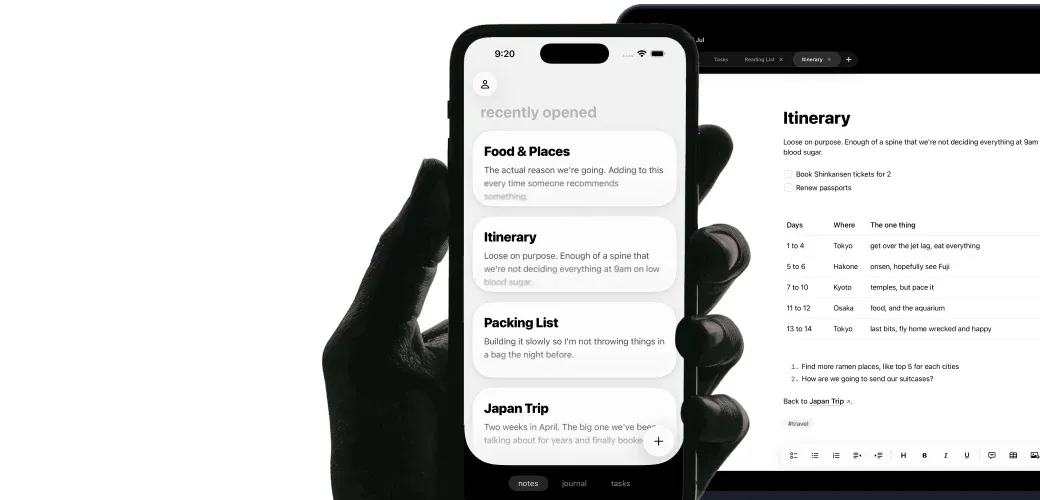
In Apple Notes, each note lives inside Apple's app. Raven saves it as a plain .md file you can open in Finder, Files, or another editor.
Plain .md files
Folders, tags, backlinks
Tables, code, and search
Instead of Apple Reminders
Tasks that stay with the plan
Apple Reminders is great for quick shared lists, but the task lives apart from the note behind it. Raven keeps tasks, due dates, and a Kanban board with the plan, so the context never disappears.
Markdown checklists
Due dates and nudges
Kanban and widgets
Instead of Apple Journal
A journal you can still read in ten years
Apple Journal keeps each entry inside one app. Raven writes daily entries as Markdown files in your folder, so they stay searchable and readable after you switch phones or apps.
Daily entries
Transcribed voice notes
Prompt suggestions
And so much more.
Native on Mac, iPhone, and iPadOptional sync across your Apple devicesFind notes straight from SpotlightWidgets for notes, tasks, folders, and JournalCapture from the Share Sheet and ShortcutsEditable Markdown tables
Lifetime offer ends August 31, 2026. Apple handles refunds.
From September 2026
New purchases are US$25/year.
Questions
Straight answers.
Can I move my Apple Notes to Raven?
Raven opens Markdown folders, so existing .md files show up immediately. Apple Notes needs to be exported to Markdown first; there is no one-click importer yet. Once exported, the files are yours to keep in Raven or open anywhere else.
What is the best Apple Notes alternative for Markdown?
Raven is for people who like Apple Notes but want their notes on Mac, iPhone, and iPad stored as plain Markdown files. Apple Notes is still better for free collaboration, scanning, handwriting, and built-in system capture.
Can Apple Notes export Markdown?
Yes. Apple documents an Export as Markup option that exports a note as a Markdown file, one note at a time. Raven stores every note as Markdown from the start, so there is nothing to export.
Can Claude read Apple Notes?
Not directly. Claude, Codex, Cursor, and local MCP clients read files they can access, and Apple Notes does not expose your notes as a normal local Markdown folder. Raven does, and Companion CLI/MCP keeps reads and edits as separate permissions.
What happens if I stop using Raven?
Your notes remain plain .md files in the folder you chose. Open them in Finder, any text editor, or git. There is nothing to export.
How does Raven sync across Mac, iPhone, and iPad?
Sync is optional. Your notes work as local files on each device, even offline. Sign in with Apple when you want the same Markdown vault on your Mac, iPhone, and iPad.
What do Apple's apps still do better?
Keep Apple Notes for document scanning, handwriting, attachments, and shared-note collaboration, which Raven has no equivalent for; Reminders for shared grocery lists and quick Siri capture; Journal for photo-and-activity suggestions. Raven is for the personal writing, plans, and tasks you want to keep as files and use in one native place.
Can AI tools work with my Raven notes?
Yes. Because every note is a real Markdown file, Claude, Codex, and any MCP client can read and edit your notes, tasks, and journal directly. No plugin, no export step. A closed Apple database can't do that.
Where do Raven notes, tasks, and journal entries live?
They live as plain .md files in a folder you control. You can open that folder in Finder or Files, back it up, put it in git, or let file-capable tools read it without exporting first.
Why switch from Apple Notes, Reminders, and Journal?
Raven puts your notes, journal, and tasks in one native app, then saves them as files you own. It also ships improvements independently of the yearly OS cycle, and your Markdown files work with Claude and Codex without an export step.



 Instead of Apple Notes