Raven

Notes you can read
without the app.

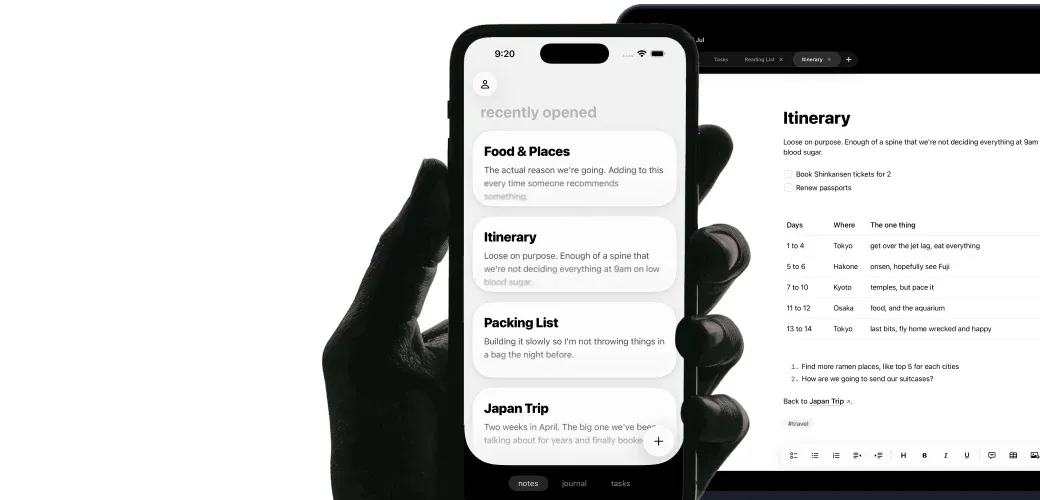
Raven keeps every note as an ordinary .md file in a folder you control, and puts native Mac, iPhone, and iPad apps around it. Local first, so it opens before the network does.

US$14 lifetime through August 31, 2026. Apple handles refunds.

If you quit Raven tomorrow, your notes are still sitting in the folder.

Instead of an export button

A note is a file. That's the whole trick.

Raven writes ordinary .md files into a folder you pick. Nothing is imported, nothing is converted, and there is no database holding your writing hostage.

  • Real .md files, in your folder
  • Open the same note in any editor
  • Move or back up the folder anytime

Instead of a sync spinner

It opens before the network does.

Raven reads and writes the local file first, so a plane, a basement, or a dead hotspot changes nothing. Sync keeps your devices in step; it isn't what lets you type.

  • Cold to cursor in under 300ms
  • Capture and edit fully offline
  • Optional sync across Mac, iPhone, iPad

Instead of a plugin weekend

Plain files, without the bare-bones part.

Plain text usually means you assemble the app yourself. Raven ships the daily Journal, tasks, tables, and backlinks already built, on real Mac, iPhone, and iPad apps.

  • Tasks across notes, with a board
  • Editable Markdown tables
  • Daily Journal and backlinks built in

One folder. Everything else can read it.

Raven is one app opening your notes folder. It was never the only one that could.

Finder, or any folder you choose
grep, ripgrep, and shell scripts
git, for version history
Any other Markdown editor
Claude, Codex, Cursor, and MCP clients
Full-text search and Spotlight on Mac
Raven showing the same Markdown folder on iPhone and Mac

Files versus a database.

What changes once the note is just a note.

Dimension Raven Database-first notes
Where notes live Plain .md files in a folder you pick An app database or cloud workspace
Opening a note elsewhere Open the file directly Export, copy, or call an API first
Offline Reads and writes local files first Depends on sync state or a cached copy
Leaving the app Stop using Raven; the files stay put Export, then clean up the export
Readable in ten years It's text Depends on the app and its export format
Automation Files on disk, plus Companion CLI/MCP App search, API, or integrations
Sync Included and optional Usually the centre of the product
Platforms Mac, iPhone, iPad Often web, Windows, and Android too
Best for Personal writing, PKM, developer notes Team documents and shared databases
Pricing US$14 lifetime through August 31, then US$25/year Usually a monthly seat

What plain text doesn't buy you.

Three things worth knowing before you pay.

Local-first is not the same as private.

Your notes work from your device, and that's all it means. Raven does not claim end-to-end encryption. What you sync, and which tools you point at the folder, is still your call.

Apple devices only.

Mac, iPhone, and iPad. No Windows, no Linux, no Android, no browser app. A work laptop running Windows is a hard stop.

No shared workspace.

Raven is a single-person app. No live co-editing, no shared databases, no comment threads. Teams should look elsewhere.

Get Raven for life.

One purchase includes Raven and future updates.

US$14 one time

Download Raven

Lifetime offer ends August 31, 2026. Apple handles refunds.

From September 2026

New purchases are US$25/year.

Questions

Straight answers.

What is a plain-text notes app?

A plain-text notes app keeps notes in readable text files instead of inside a private database. Raven uses Markdown, so each note is an ordinary .md file and a heading still reads as a heading with the app closed.

What is a local-first notes app?

A local-first notes app works from the copy on your device rather than the copy on a server. Raven is local-first because the notes are Markdown files in a folder you control. Sync sits on top of that, not underneath it.

Is Markdown the same as plain text?

Close enough. Markdown is plain text with a few formatting conventions on top. The file stays readable in any text editor, and apps like Raven render the symbols into headings, links, and tasks.

Where does Raven store my notes?

As .md files in a folder you choose. On Mac you can open that folder in Finder and use it with anything else. Raven keeps its own app metadata separate from the writing.

Does Raven work without internet?

Yes. Opening and editing a note reads and writes a local file, with no server round trip. Only sync between devices needs a connection.

Can I open my notes in another app?

Yes, including at the same time. The files are ordinary Markdown, so another editor can have the folder open while Raven does.

Does plain text mean bare bones?

Plain text describes the storage, not the app. Raven puts native Mac, iPhone, and iPad apps around those files, with search, folders, backlinks, tables, tasks, and a daily Journal.

Is local-first the same as private?

No. Local-first means the app works from your device first. Privacy depends on what you sync, what you install, and which tools get folder access. Raven does not claim end-to-end encryption.

Why does plain text matter for Claude, Codex, and Cursor?

Those tools read files. Notes that are already Markdown need no export step, so a folder of Raven notes is readable as-is. Raven Companion adds a permissioned CLI and MCP path for Raven-aware note and task edits.

What does Raven cost?

US$14 once for lifetime access through August 31, 2026, sync and future updates included. From September 2026, new purchases are US$25/year. Lifetime buyers keep everything. Apple handles refunds.