

Raven logo

Raven

Native Markdown Notes

Pricing

Updated May 20, 2026 for Raven's current Mac and iPhone feature set.

Raven

Same native feel. Your notes are actual files.

Raven is a native Markdown notes app for Mac and iPhone. The part you came to Bear for, the typography, scrolling, and feel under your thumb, gets attention here too. The difference: every note is a plain .md file in a folder you can open. The storage model is visible files rather than a SQLite database, export step, or subscription.

Move notes to real files

$14 lifetime until June 30. Keep the native feel. Lose the database.

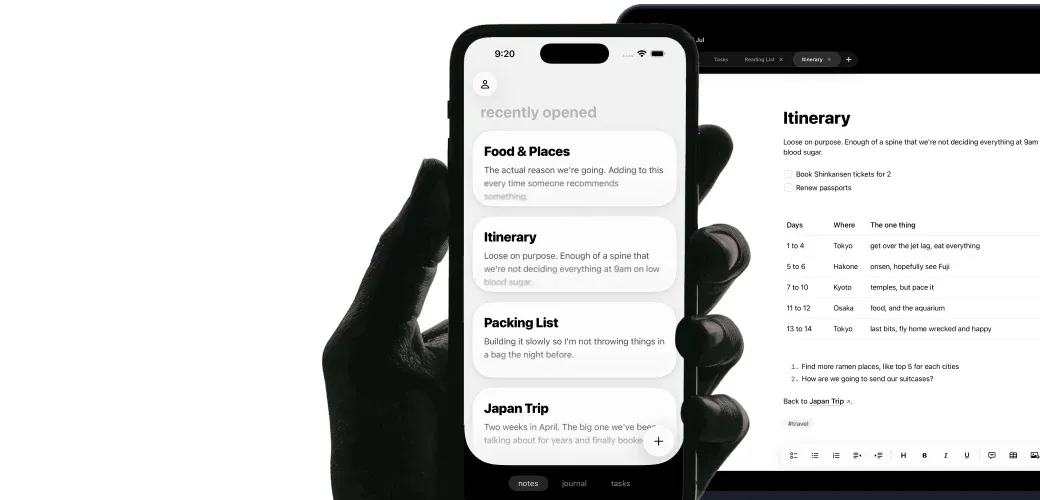
Raven iPhone editor showing the current writing toolbar, headings, and clean native typography.

Raven keeps the part Bear users notice first: a native, typographically careful Apple app on Mac and iPhone. It replaces the SQLite database with a folder of plain .md files. You get [[wiki-style]] backlinks, Claude and MCP folder access, and a $14 one-time price instead of a $30-a-year subscription.

See how portable your Bear notes are →

What sends long-time Bear users looking.

Bear is a beautiful app. These are the trade-offs that send people out.

Your notes are trapped in a SQLite database.

Bear's beautiful app is a window onto a proprietary SQLite file. You can't open a note in Finder. You can't grep your vault. You can't hand it to Claude. If you want to use your own writing elsewhere, you export first.

Panda has been 'coming soon' for years.

The next-generation Bear editor has been in perpetual beta since 2020. You love the app you have. You're also aware the app you have is waiting on a rewrite that keeps not landing.

Subscription with no lifetime option.

$29.99 every year, forever. Skip a year and you lose sync. For an app you use daily, the math adds up. Raven still offers a one-time price through June 30, 2026.

Claude can't reach your notes.

Claude, Cursor, and MCP servers work with plain files on disk. Bear's notes aren't on disk in a form they can read. Every outside tool needs an export first.

What you get when you switch.

Your writing becomes a folder again.

Raven stores every note as a plain .md file in a folder you can open. Finder, Terminal, git, and Claude can see your notes the moment you save.

Same native feel. Less friction.

Raven is SwiftUI and UIKit, built for Mac and iPhone. The typography, scrolling, and keyboard behavior get the same care as the file format.

$14. Once. Not once a year.

Lock in lifetime access at $14 through June 30, 2026. Subscription only from July 1, 2026. One payment, no yearly renewal, every future update included.

Claude can read the vault folder.

Every note is a .md file on disk. Point Claude or any MCP agent at your vault and it works through folder access.

Raven vs Bear, side by side.

Choose Raven for files, backlinks, and Claude access. Choose Bear for tags, encryption, and attachment polish.

Raven Raven
Bear Bear
Plain .md files on disk · Bear uses SQLite -
Native Mac app
Native iPhone app
Beautiful out of the box
Fast open time
[[Wiki-style]] backlinks -
Hashtag organization -
Grep / git / terminal access -
Works with Claude / MCP agents · SQLite blocks agent access -
Cloud sync
One-time purchase option · Bear is subscription-only -
Free tier -
Encrypted notes (Face ID) -
Table support
Rich inline attachments -
Daily and weekly Journal -
Tasks across notes -
Active development · Panda delayed

Who should switch. Who shouldn't.

Choose Raven for file-first writing. Stay with Bear for encrypted notes, OCR search, themes, and hashtag organization.

Raven

Switch to Raven if...

  • People who want their notes as plain files they can grep, git, or hand to Claude
  • People who want a one-time purchase instead of a subscription
  • People who've been waiting years for Panda and want active development
  • People who use [[wiki-links]] for knowledge management
  • People who want Claude or Cursor to read a notes folder directly
Bear

Stay on Bear if...

  • People who love Bear's specific typography and editor feel
  • People who prefer hashtag organization over folders and wiki-links
  • People who want encrypted notes with Face ID / Touch ID
  • People who work with heavy inline images and attachments
  • People content with a subscription model

Export once. Keep the folder from then on.

Bear's Markdown export is the only migration step you'll need. From then on, your notes are a folder you can open anywhere.

Export your Bear notes as Markdown (File → Export Notes → Markdown)

Drop the exported folder anywhere on disk; that becomes your Raven vault

Hashtags in your notes remain as plain-text `#tags` in the Markdown

Images and attachments are exported alongside the notes

Your Bear library stays untouched if you want to keep both apps during the transition

Bear-specific questions.

How do I move my Bear notes to Raven?
Open Bear on your Mac, choose File → Export Notes → Markdown, and save the export anywhere on disk. That folder is now your Raven vault. Your hashtags remain as plain-text tags in the Markdown, and your images and attachments export alongside the notes.
Will my hashtags still work?
Your Bear hashtags stay inside the exported Markdown as plain-text `#tags`. Raven does not yet have a hashtag browser on par with Bear's. Tag support is on the roadmap. If hashtag-based navigation is central to how you work, this is something to weigh.
Can I keep using Bear while I try Raven?
Yes. The Bear export is a copy, so your Bear library is untouched. Run both apps side by side until you're confident Raven is the right move. Apple refunds Raven within 48 hours if you change your mind.
Does Raven have [[wiki-style]] backlinks?
Yes. Raven supports [[wiki-style]] links between notes and shows every note that links back to the one you're reading. Bear uses hashtags for organization; Raven adds wiki-links and backlinks.
Does Raven have encrypted notes like Bear?
Not today. If encrypted notes with Face ID are a core requirement for you, Bear has the better feature set for that specific use case right now.
Why plain files instead of a database?
Plain .md files mean your writing is readable by every editor, terminal, Claude, and Cursor on your Mac, today and in ten years. A database gives the app more control over structure, but it puts a wall between your writing and every other tool you use. Raven chose the folder.
What does Raven cost compared to Bear?
Bear Pro is $2.99/month or $29.99/year, with no lifetime option. Raven is $14 one-time through June 30, 2026, then subscription-only at $2.49/month or $24.99/year from July 1, 2026. If you buy the $14 lifetime now, you break even against Bear's yearly plan in under six months.
Is Raven as polished as Bear?
Raven is built by a developer who cares about launch speed, typography, and native Apple behavior. Bear has years of refinement behind it. The 48-hour refund window lets you judge which side of that comparison matters to you.

Your notes. Your folder. Native.

Lock in lifetime at $14. Subscription-only from July 1, 2026.

Move notes to real files

Apple refunds in 48 hours. Your vault is a folder you can always open elsewhere.

Also looking at Obsidian or doing a Raven vs Bear comparison?