

Raven logo

Raven

Native Markdown Notes

Pricing

Updated May 20, 2026 for Raven's current Mac and iPhone feature set.

Raven

Keep your .md vault. Drop the Electron overhead.

Raven is a native Markdown notes app for Mac and iPhone. It reads the same plain .md files Obsidian does, with the same [[backlinks]] and the same folder-based vault. The difference is the app around those files: a native Mac and iPhone interface instead of Electron plus plugin setup.

Use your vault in Raven

$14 lifetime until June 30. Keep the vault. Lose the setup drag.

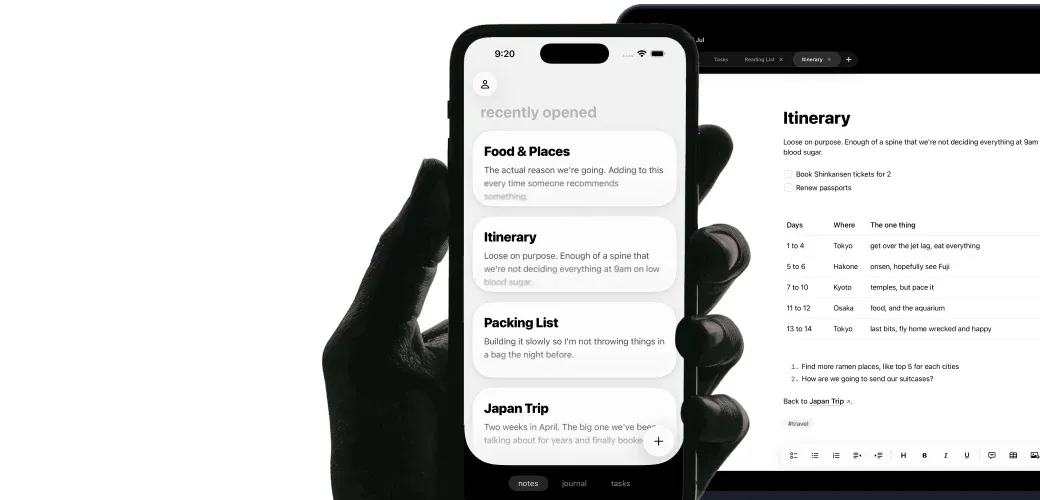
Raven iPhone editor showing the current writing toolbar, headings, and clean native typography.

Raven uses the same folder-based Markdown model as Obsidian, with an Apple-native app around it. Same .md files, same [[wiki-links]], same vault ownership. Built in SwiftUI and UIKit. Opens in under a second. Works with Claude and MCP agents because your notes are already plain files.

Test how portable your vault is →

What you run into after a few months on Obsidian.

Obsidian's plugin model and cross-platform reach are real strengths. These are the trade-offs that send people looking.

Electron on Mac, every time you open it.

Obsidian can use hundreds of MB of memory before you write a sentence. The engine underneath is a browser, and you feel that in startup time, scrolling, and battery use.

An iOS app that feels wrapped.

Obsidian's iPhone app is a wrapper. The taps feel half a frame late, keyboard handling feels awkward, and the plugins you rely on don't all work there. Writing on the phone is second class.

A lot of setup before it feels ready.

Themes, CSS snippets, Dataview, Templater, hotkeys, a calendar plugin, a tasks plugin. The setup can be worth it, but it can also become the work.

Slow to open when the idea is small.

Command-Space, 'obsidian', enter, wait. Splash screen, workspace rehydration, plugin load. By the time you can type, you've forgotten what you were going to write.

What you get when you switch.

Native SwiftUI. On both devices.

Raven is built in SwiftUI and UIKit for Mac and iPhone. The scrolling, keyboard handling, and touch response feel like an Apple app because the app is written for those platforms.

Opens in under a second.

Command-Space, type 'Raven', and the app is ready for your cursor without a splash screen, workspace restore, or plugin load sequence.

Your vault stays exactly where it is.

Raven reads the same plain .md files Obsidian does. Point it at your existing vault folder and your backlinks, folders, and YAML frontmatter all resolve. You can still open the same vault in Obsidian any time.

Claude can read the same .md vault.

Because every note is a file on disk, Claude, Cursor, and any MCP agent can read your vault directly through folder access.

Raven vs Obsidian, side by side.

Raven is for Apple-native speed and setup. Obsidian is for plugins, graph view, and cross-platform reach.

Raven Raven
Obsidian Obsidian
Plain .md files on disk
[[Wiki-style]] backlinks
Native Mac app (SwiftUI / AppKit) · Obsidian is Electron -
Native iPhone app (SwiftUI / UIKit) · Obsidian's mobile app is a wrapper -
Sub-second launch -
Beautiful out of the box -
Cloud sync included · Obsidian Sync is a paid add-on -
Works with Claude / MCP agents · Both use plain files
Low memory footprint -
Plugin ecosystem -
Graph view -
Community themes -
Windows / Linux support -
Android support -
Table support
Daily and weekly Journal -
Tasks across notes · Obsidian usually needs plugins
Mermaid diagrams Soon

Who should switch. Who shouldn't.

Choose Raven for native Apple speed. Stay with Obsidian for plugins, graph view, and cross-platform vaults.

Raven

Switch to Raven if...

  • People who just want to open an app and write
  • People who primarily use a Mac and an iPhone
  • People who care about startup time and input latency
  • People who want a native Apple experience out of the box
Obsidian

Stay on Obsidian if...

  • People who depend on specific plugins like Dataview or Templater
  • People who use the graph view every day
  • People who need Windows, Linux, or Android in addition to Apple
  • People who enjoy configuring their tools
  • People with very large vaults (10k+ notes) and complex linking

Keep your vault. Skip the config weekend.

Your Obsidian vault is already a folder of .md files. That's what Raven reads. Open the same folder in Raven and keep Obsidian installed while you compare.

Point Raven at your existing Obsidian vault folder and it works immediately

Your [[wiki-style]] backlinks resolve in Raven

Your folder structure and YAML frontmatter are preserved

Obsidian plugins are not supported in Raven; your underlying notes are unaffected

You can keep opening the same vault in Obsidian any time. Nothing is locked in.

Obsidian-specific questions.

Can I keep using my existing Obsidian vault?
Yes. Raven reads the same plain .md files Obsidian does. Point Raven at your existing vault folder and it works immediately. Your folders, notes, and YAML frontmatter stay in place.
Will my [[backlinks]] still work?
Yes. Raven resolves the same [[wiki-style]] links that Obsidian uses. You can see every note that links back to the one you're reading, the same way you do in Obsidian.
What about my Obsidian plugins?
Raven does not support Obsidian plugins. Your text, backlinks, and frontmatter stay the same, but plugin behavior does not carry over. If you rely on Dataview, Templater, or another specific plugin every day, stay with Obsidian.
Can I go back to Obsidian if I change my mind?
Yes. Your files stay in their folder. You can open the same vault in Obsidian at any time. Raven reads the plain .md files in place.
Does Raven have a graph view?
Not today. If the graph view is a core part of how you think about your notes, Obsidian is still the right tool for you. Raven focuses on speed, native feel, and the writing itself.
Is Raven really faster than Obsidian?
Yes, measurably. Raven opens in under a second from a cold start because it's native Swift code with no splash screen, no plugin load, and no workspace rehydration. Obsidian starts a browser engine, then a workspace, then the plugins.
Does Raven work with Claude and MCP agents?
Yes. Because Raven's notes are plain .md files in a folder on disk, Claude, Cursor, or an MCP server with filesystem access can read, search, and write your notes without a plugin or export step.
Does Raven work on Windows, Linux, or Android?
No. Raven is Mac and iPhone only. If cross-platform is a hard requirement for you, Obsidian is the better choice.

Your vault, native on Apple.

Lock in lifetime at $14. Subscription-only from July 1, 2026.

Open your Obsidian vault

Apple refunds in 48 hours. Your vault is a folder you can always open elsewhere.

Want the side-by-side? Read Raven vs Obsidian.