Updated June 20, 2026 with current Raven pricing and feature comparisons.
Raven vs Obsidian
Obsidian gives you files. Raven keeps them lighter.
Both store your notes as plain .md
files. Both use [[wiki-links]].
Choose Raven for an instant Apple-native app around your files. Choose Obsidian for a cross-platform workspace with plugins and a graph view.
$14 lifetime until July 31. Keep the vault and write faster from day one.
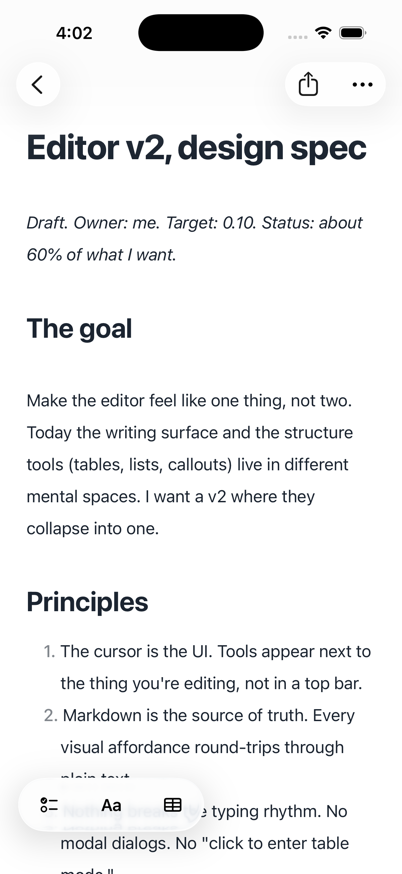
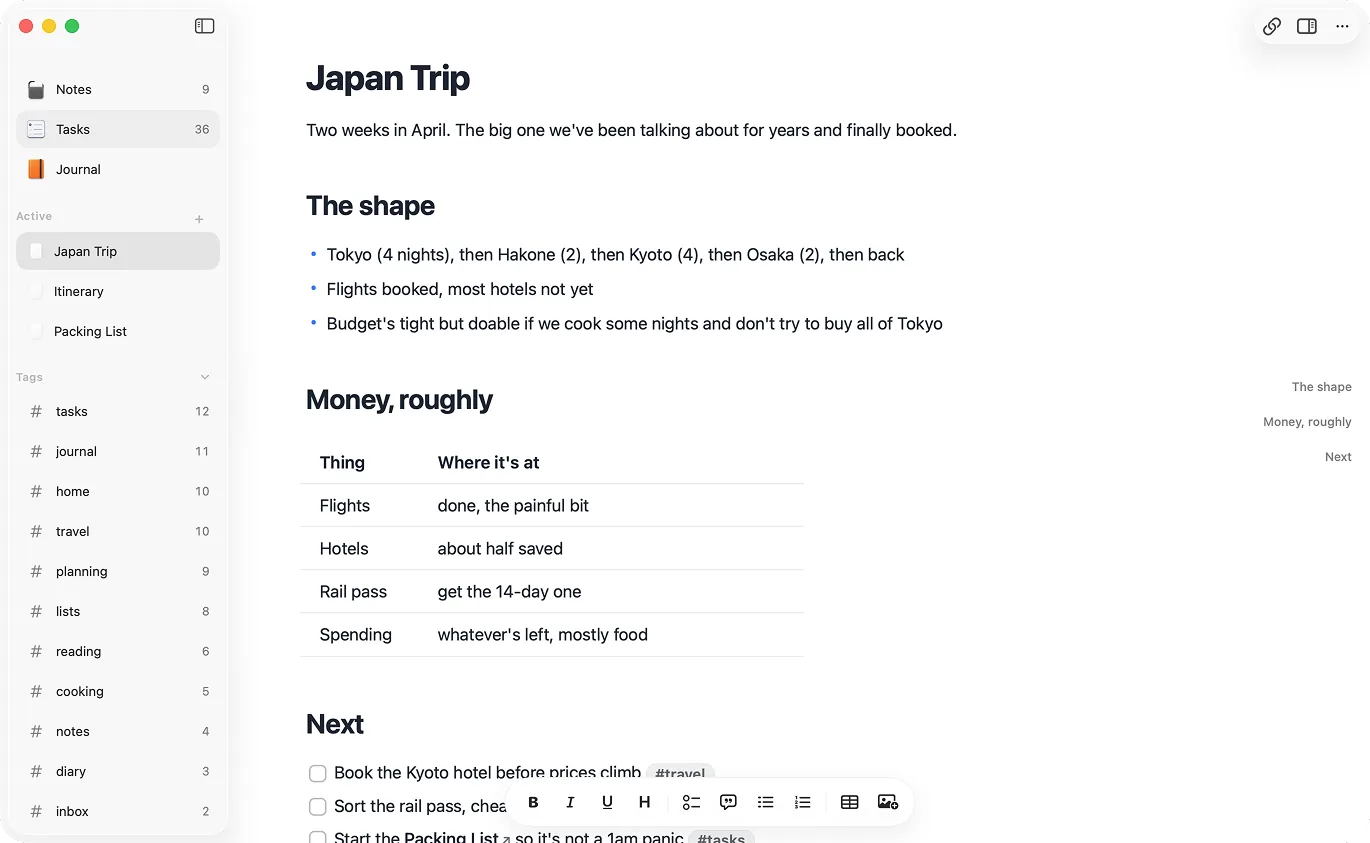
Same file ownership. Different app philosophy.
Obsidian gives you a workshop. Raven gives you a native app around the same kind of folder.
Design principles
What Raven protects.
Principle #1
Ownership
Both apps keep notes as `.md` files. Raven keeps that model and removes the plugin workshop around it.
Principle #2
Instant feel
Raven is built for Apple devices first, so opening, typing, and searching feel local.
Principle #3
Platform fit
Obsidian reaches every platform. Raven goes deeper on Mac, iPhone, iPad, Companion CLI/MCP, widgets, and Shortcuts.
Choose Raven if you work mostly on Apple devices and want ownership, instant feel, tables, Journal, Tasks, and less setup.
Choose Obsidian if you need cross-platform support, depend on plugins like Dataview or Templater, or use the graph view every day.
Either way, your .md vault is portable between them.
At a glance.
| Dimension |  Raven
Raven
|  Obsidian Obsidian |
|---|---|---|
| Best at | Native feel on Apple devices, speed, simplicity | Extensibility, graph, cross-platform |
| Platforms | Mac, iPhone, iPad | Mac, iPhone, iPad, Windows, Linux, Android |
| Engine | Native SwiftUI / UIKit | Electron (on desktop) |
| Launch time | Under a second | Several seconds (plugin-dependent) |
| Setup required | None | Plugins, themes, CSS, hotkeys |
| Sync | Cloud sync, included | Paid add-on (or DIY via iCloud/Dropbox) |
| Tables | Built-in editing | Supported |
| Journal | Daily and weekly notes built in | Plugin/config driven |
| Tasks | Across notes with filters | Plugin/config driven |
| Pricing | $14 lifetime (through July 2026) | Free personal; paid sync; $50 commercial |
Where they differ.
Platform and feel
Raven Native Mac app in SwiftUI and AppKit. Native iPhone app in SwiftUI and UIKit. One universal purchase covers both devices. Scrolling, keyboard, and input latency feel like a first-party Apple app because the app is written against Apple's own frameworks.
Obsidian Electron on Mac, Linux, and Windows. A wrapped app on iOS and Android. The benefit is platform coverage; the trade-off is that the Mac, iPhone, and iPad apps do not feel tailored to either device.
Performance
Raven Opens in under a second from a cold start. It skips splash screens, workspace rehydration, and plugin loading. Memory footprint is small because the app is compiled native code, not a packaged browser.
Obsidian Launch is noticeably slower because Obsidian is a full browser engine plus a workspace plus whatever plugins you have installed. Memory usage sits in the hundreds of MB range even on modest vaults.
Extensibility
Raven No plugin system. What ships is what you get. That means fewer surprises, faster updates to the core app, and no plugin-compatibility breakage. The trade-off is obvious: if you want to extend the app, you can't.
Obsidian Huge plugin ecosystem. Dataview, Templater, Calendar, Kanban, Excalidraw, and hundreds more. Plugins are the main reason many people stay with Obsidian. They are also where much of the configuration overhead comes from.
Linking and knowledge management
Raven [[Wiki-style]] backlinks. You can see every note that links back to the one you're reading. Full-text search. No graph view today.
Obsidian [[Wiki-style]] backlinks, a graph view, canvas, and a deeper set of link-oriented tools. If you build a personal knowledge base out of explicit connections, Obsidian has more primitives available.
Setup
Raven Install, open, write. The default design is ready before you browse plugin stores, paste CSS snippets, or pick themes.
Obsidian Install, then spend an afternoon (or a weekend) picking a theme, installing plugins, learning their syntax, and tuning hotkeys. It can be worth the setup if you use those plugins every day.
Platforms
Raven macOS, iOS, and iPadOS only. If you work exclusively on Apple devices, this is the point. If you don't, it's a hard stop.
Obsidian macOS, Windows, Linux, iOS, and Android. If you use a Windows laptop for work and an iPhone personally, this matters.
Agent access
Raven Raven stores notes as plain .md files, so Claude, Codex, Cursor, and local MCP clients can read the vault without export. Raven Companion adds permissioned Raven-aware writes through the Sync layer.
Obsidian Your vault is also a folder of .md files. Obsidian itself doesn't have first-party assistant or MCP integration, but the file format doesn't lock anything out.
How to pick.
Start with the device you use every day and the features you refuse to give up.
Choose Raven if...
- People who just want to open an app and write
- People who primarily use a Mac and an iPhone
- People who care about startup time and input latency
- People who want a native Apple experience out of the box
Choose Obsidian if...
- People who depend on specific plugins like Dataview or Templater
- People who use the graph view every day
- People who need Windows, Linux, or Android in addition to Apple
- People who enjoy configuring their tools
- People with very large vaults (10k+ notes) and complex linking
Pricing, side by side.
What each one costs for everyday use with sync across devices.
What does Obsidian cost?
What does Raven cost?
Which is cheaper long-term?
Try the native one.
Your vault works in both. If Raven doesn't click, Apple handles refunds through Report a Problem, and your files stay where they are.
$14 lifetime now. Subscription-only from August 1, 2026.
Actively switching? Read Obsidian alternative.